anonymous216.73.217.68
Door Tablet CONNECT: Workspace management without the server management
Run Door Tablet in the cloud with Door Tablet CONNECT.
Door Tablet CONNECT gives you a fast and simple way to deploy Door Tablet without setting up or maintaining your own server. We manage the infrastructure, so you can focus on managing your rooms, desks and workplace.
- Cloud hosted
- Fast deployment
- Fully managed
What CONNECT is
A simpler way to run Door Tablet
Door Tablet CONNECT is our cloud-based, multi-tenant solution, hosted on AWS infrastructure. It gives you the functionality of Door Tablet without the need to install, configure and maintain your own Door Tablet server.
Connect your cloud-based scheduling system, configure your workplace and manage your Door Tablet solution through one central Web UI.
See how Door Tablet CONNECT works and how simple it is to get your Door Tablet environment up and running.
Watch the CONNECT video
Why CONNECT
Why choose Door Tablet CONNECT?
No server infrastructure
There is no need to provision your own PC, virtual machine or dedicated Door Tablet server. CONNECT provides the infrastructure you need to run Door Tablet in the cloud.
Fast deployment
Forget lengthy server installations. Once your Door Tablet CONNECT request has been approved, your dedicated instance can be created in seconds, getting you ready to start configuring your workplace quickly.
Managed by Door Tablet
We take care of the Door Tablet CONNECT server environment, removing the need for your team to install and maintain your own Door Tablet server.
Choose your location
When requesting Door Tablet CONNECT, tell us where you are located and we will provision your instance in the appropriate available region. This helps organisations meet their requirements around where their Door Tablet environment is hosted.
Ready to grow
Whether you are managing a small workplace or expanding across more rooms, desks and locations, Door Tablet CONNECT gives you central management for your Door Tablet deployment.
Simple administration
Access the Door Tablet Web UI to manage your workplace, scheduling system connections, users, displays, branding, licensing and more from one central interface.
Full functionality
Everything Door Tablet. Delivered through CONNECT.
Door Tablet CONNECT is not a limited version of Door Tablet. It gives you the functionality of a dedicated Door Tablet server without requiring you to manage the server infrastructure yourself.
Use Door Tablet CONNECT as the foundation for your complete workplace management solution.
Scheduling
From your calendar to your workplace
Door Tablet CONNECT brings your scheduling system and your physical workplace together.
Door Tablet CONNECT is designed for organisations using cloud-based scheduling platforms. Door Tablet connects with your scheduling environment and synchronises your workplace resources, allowing information to flow through to the displays and solutions used throughout your workplace.
Your existing scheduling platform remains at the centre of your booking environment, while Door Tablet adds the tools needed to manage and optimise the physical workplace.
Explore Door Tablet Integrations
Getting started
Get started in a few simple steps
Getting started with Door Tablet CONNECT is designed to be simple.
- 01
Request CONNECT
Contact Door Tablet and let us know you would like to use Door Tablet CONNECT.
Let us know where your organisation is located so we can determine the appropriate available Door Tablet CONNECT region for your deployment.
- 02
We enable CONNECT
Your Door Tablet account manager enables Door Tablet CONNECT for your account, ready for you to create your instance.
- 03
Create your instance
Log in to your Door Tablet account and create your CONNECT instance. Once approved, the instance itself can be provisioned in seconds.
- 04
Configure your workplace
Open the Door Tablet Web UI, configure your system and connect your cloud-based scheduling platform.
- 05
Connect your devices
Connect your Door Tablet endpoints to your new instance and start managing your workplace through Door Tablet CONNECT.
Central administration
One place to manage your workplace
Door Tablet CONNECT gives administrators access to the Door Tablet Web UI – the central management interface for your Door Tablet system.
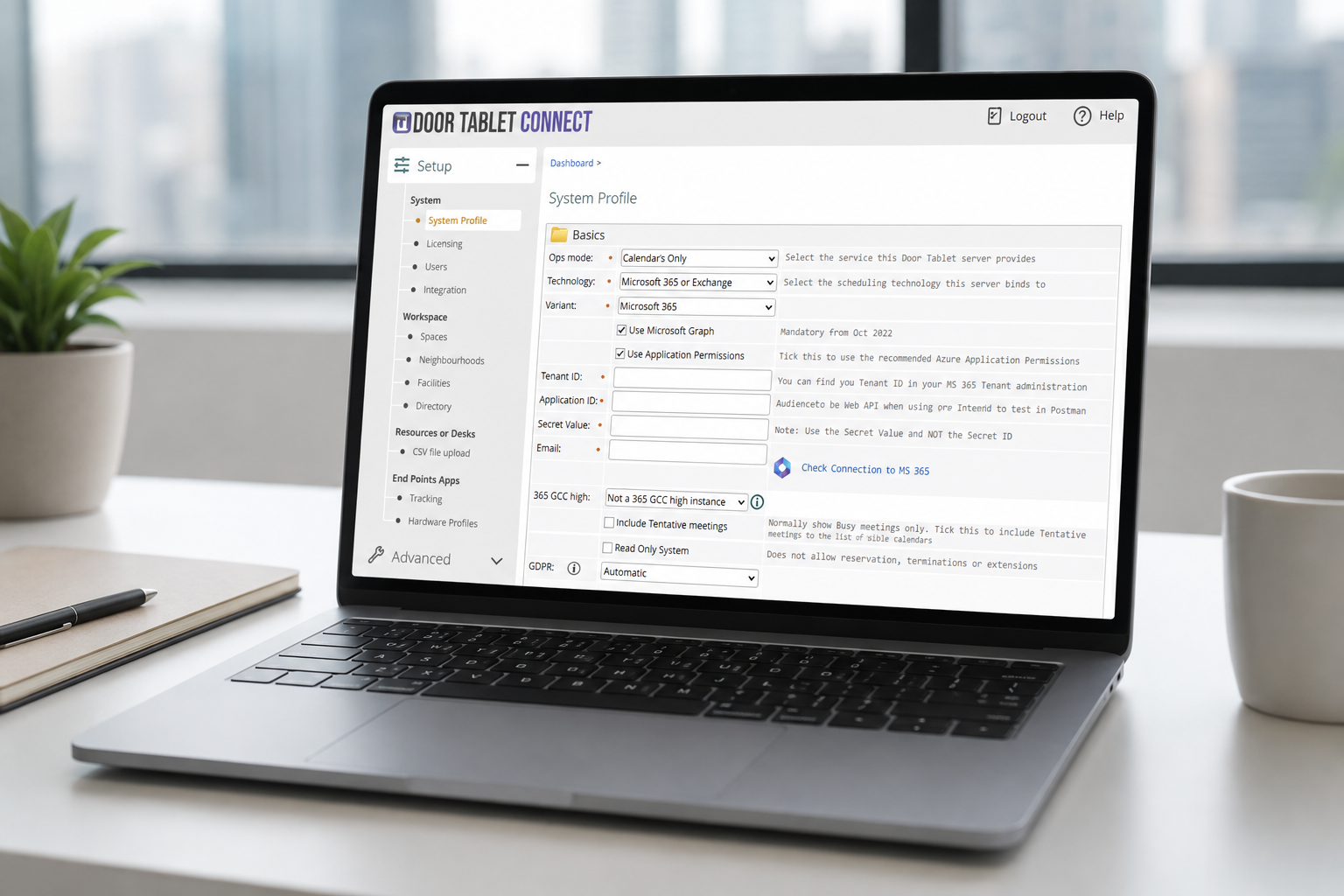
- Connect Door Tablet to your scheduling system
- Create and manage workplace resources
- Manage spaces and desks
- Control display access
- Manage users and administrator access
- Customise branding
- Manage Door Tablet messages
- Manage licensing
- Access system logs
All without having to manage your own Door Tablet server.
Deployment options
Door Tablet CONNECT or your own server?
Door Tablet gives you the flexibility to choose the deployment model that works for your organisation.
Choose Door Tablet CONNECT if you want:
Less infrastructure No dedicated Door Tablet server to provision and maintain.
Fast deployment Get your cloud environment up and running quickly.
Cloud-based scheduling An ideal option when your scheduling environment is already in the cloud.
Simple administration Let Door Tablet manage the server environment while your team manages the workplace.
Your own server may be better if you:
Require complete infrastructure control Run Door Tablet within infrastructure managed by your own organisation.
Use an on-premise scheduling system Door Tablet CONNECT is designed for cloud-based scheduling environments.
Need everything inside your firewall An on-premise deployment gives you greater control over where your Door Tablet environment resides.
Have specific infrastructure requirements Larger or specialised deployments may benefit from a dedicated Door Tablet server.
Already using Door Tablet?
Move to CONNECT
Choosing a server architecture today does not mean you are locked into it forever.
Door Tablet supports migration between server types, allowing existing customers to move from using their own server to Door Tablet CONNECT and vice versa.
Most existing configurations can be ported, while some elements such as branding may require adjustment. Our team will work with you to support the migration and get your Door Tablet CONNECT environment ready.
Talk to us about migrating
Server management made simple. Full Door Tablet functionality.
Remove the need to install and maintain your own Door Tablet server while keeping the tools you need to manage your workplace.
With fast deployment, central administration and Door Tablet managing the underlying server environment, Door Tablet CONNECT makes it easier to deploy and manage Door Tablet across your organisation.
Ready to CONNECT your workplace?
doortablet/dtcms.nsf/doortablet/dtcms.nsf::/doortablet/css/dt.css?rnd=45671" id="dt-css" data-dummy="dtx-containerpages62D5A9CC32069C1080258E6E002E8F69Door Tablet CONNECT