anonymous216.73.217.68
Door Tablet On-Premise:
Your infrastructure.
Your control.
Run Door Tablet on your own server, within your organisation's IT environment.
Door Tablet On-Premise gives you control over where your server is hosted and how it is managed. Deploy on a dedicated PC or virtual machine, connect your scheduling systems and manage rooms, desks and workplace resources centrally.
- Self-hosted
- Physical or virtual server
- Infrastructure control
What On-Premise is
Door Tablet within your own IT environment
With Door Tablet On-Premise, your organisation installs and operates the Door Tablet server on infrastructure it manages.
The software can run on a suitable dedicated computer or virtual machine. Your IT team manages server hosting, network access, security policies and infrastructure maintenance.
Door Tablet connects your scheduling system with the displays and workplace solutions used throughout your organisation.
This option is particularly suitable for organisations with internal hosting policies, specific security requirements or scheduling systems operating within their own network.
Why On-Premise
Why choose Door Tablet On-Premise?
Infrastructure control
Host Door Tablet on infrastructure managed by your organisation, with control over server configuration, access and administration.
Physical or virtual server
Install Door Tablet on a suitable dedicated PC or virtual machine, making use of existing IT infrastructure where appropriate.
Your security policies
Keep the server within your IT environment and configure access, firewall rules and network connectivity according to your policies.
Scheduling flexibility
Connect to supported on-premise scheduling platforms such as Microsoft Exchange and HCL Domino, or compatible cloud-based systems.
Ready to grow
Support additional rooms, desks and devices as your requirements grow, with Enterprise server options for larger deployments.
Central administration
Manage workplace resources, users, displays, branding and licensing through the Door Tablet Web UI, while hosting the server yourself.
Full functionality
Everything Door Tablet.
Hosted by you.
Your on-premise server provides the foundation for Door Tablet workplace management solutions, with available functionality depending on your server edition and licences.
Bring room booking, hot desks, wayfinding and ePaper together within your own IT environment.
Scheduling
From your calendar to your workplace
Door Tablet On-Premise connects your scheduling system with the physical workplace.
Door Tablet supports compatible on-premise scheduling platforms, including Microsoft Exchange and HCL Domino, as well as supported cloud-based scheduling systems.
Your existing scheduling platform remains at the centre of your booking environment, while Door Tablet adds the tools needed to manage and optimise the physical workplace.
Explore Door Tablet Integrations
Getting started
Deploy Door Tablet on your own server
Prepare your hosting environment, install Door Tablet and connect your workplace.
- 01
Plan your deployment
Confirm your room and desk requirements, scheduling integration, number of devices and appropriate Door Tablet server edition.
- 02
Prepare your server
Provision a suitable physical computer or virtual machine with the required network connectivity.
- 03
Install Door Tablet
Install the Door Tablet server software and apply your licence and system configuration.
- 04
Configure your workplace
Open the Door Tablet Web UI, connect your scheduling platform and configure rooms and resources.
- 05
Connect your devices
Connect your Door Tablet endpoints to your server and start managing your workplace centrally.
Central administration
One place to manage your workplace
Hosting Door Tablet on your own server does not mean managing every display individually. The Door Tablet Web UI provides central administration of your system.
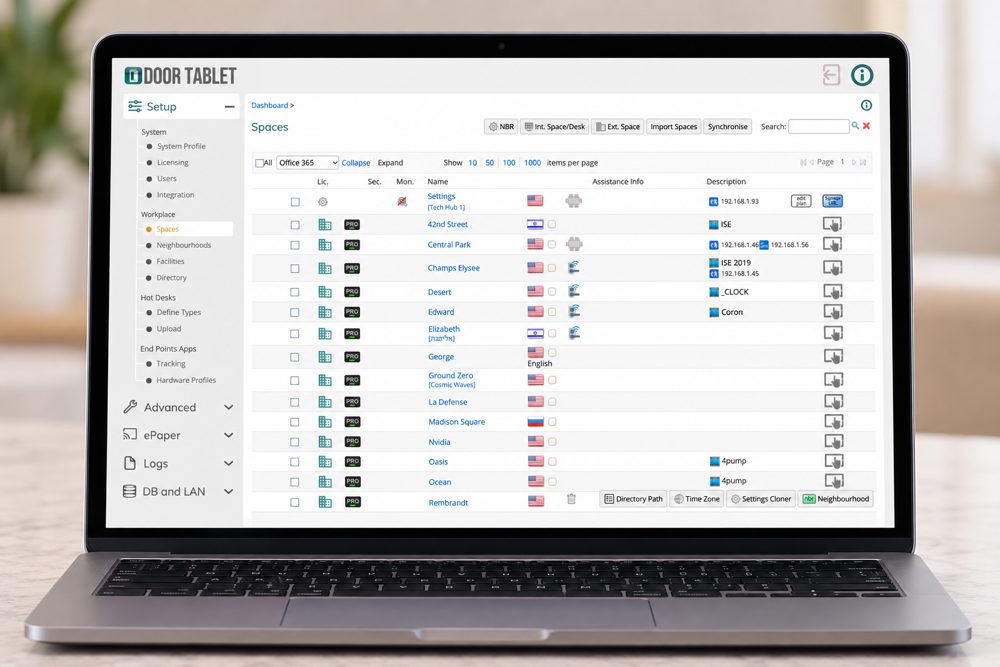
- Connect Door Tablet to your scheduling system
- Create and manage workplace resources
- Manage rooms and desks
- Control display access
- Manage users and administrator access
- Customise branding
- Manage Door Tablet messages
- Manage licensing
- Access system logs
Your workplace, centrally managed. Your server, under your control.
Deployment options
On-Premise or Door Tablet CONNECT?
Door Tablet gives you the flexibility to choose the deployment model that works for your organisation.
Choose On-Premise if you want:
-
Infrastructure control Operate Door Tablet on infrastructure managed by your own IT team.
-
Internal scheduling systems Connect to supported scheduling platforms within your network.
-
Your security policies Configure network access, firewall rules and infrastructure settings according to your requirements.
-
IT-managed hosting Manage server maintenance and infrastructure according to your organisation's processes.
Choose Door Tablet CONNECT if you want:
-
No local server Avoid provisioning and maintaining your own Door Tablet infrastructure.
-
Fast cloud deployment Create your cloud environment without installing server software locally.
-
Cloud-based scheduling Connect to supported cloud-based scheduling platforms.
-
Managed hosting Door Tablet manages the server environment while your team manages its workplace resources.
Already using Door Tablet?
Move between server options
Your server architecture can evolve with your organisation.
Door Tablet supports migration between server types, including moving from a self-hosted deployment to CONNECT or the other way around.
Most existing configurations can be transferred, although some elements, such as branding or environment-specific settings, may need adjusting. Our team can advise on planning a migration.
Talk to us about migrating
Complete Door Tablet functionality. Hosted on your infrastructure.
Run Door Tablet on your own PC or virtual machine and keep control over your server environment, network configuration and operational policies.
Connect your scheduling systems to meeting room displays, hot desks, wayfinding and more, all managed through the Door Tablet Web UI.
Ready to deploy Door Tablet On-Premise?
doortablet/dtcms.nsf/doortablet/dtcms.nsf::/doortablet/css/dt.css?rnd=45671" id="dt-css" data-dummy="dtx-containerpagesDEBEBF68A5C777E180258E7B004B3AE9Door Tablet Server on premise